
The preset editor is a single page for the policy, its categories, its test evidence, and its version history. Open a preset from Presets to use it.
Edit the draft
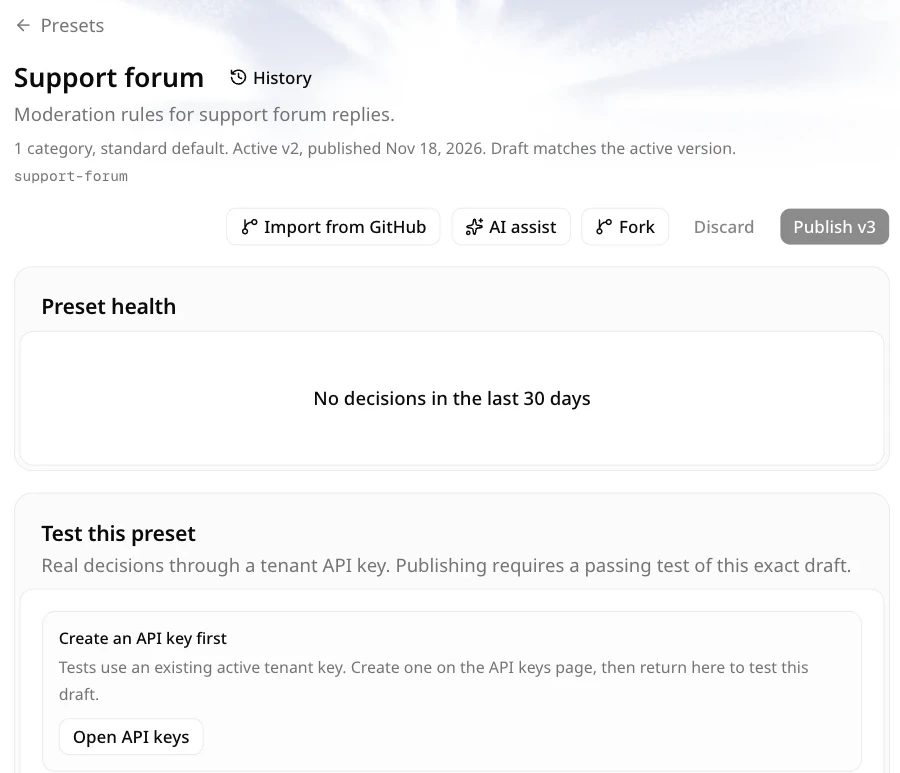
The header holds the preset name, description, default level, Fork, the version button (for example v2), Import from GitHub, and publish controls. Preset health comes next, followed by the Test this preset panel. Below them, the Decision rules panel edits the selected category's flag and block thresholds, and the category list holds each category's name, description, allow examples, block examples, severity, and enabled state.
| Field | Limit |
|---|---|
| Categories | Up to 25 |
| Name | Up to 80 characters |
| Description | Up to 2,000 characters |
| Examples | Up to 8 per list, 280 characters each |
| Severity | Integer from 1 to 10 |
Edits are local to the tab. The status bar counts unsaved changes. Discard restores the active version's content. Closing the tab discards the draft; there is no server-side draft to recover.
Test the exact draft
The test panel runs the current draft against a real key. It is not a simulation.
- Choose a key whose allowed levels include the preset's default level.
- Enter up to 5 sample messages. Each sample is capped at 8,000 UTF-8 bytes after normalization.
- Each successful sample is a real, billable decision at the key's normal rate.
- A timed-out sample produces no evidence and no charge for that sample. Earlier samples in the run remain billed.
Creating a preset, forking a preset, and publishing a new version require evidence for the exact policy hash at the default level. A degraded fallback, a failed run, or a test of older content does not satisfy that requirement.
Publish and roll back
Publish vN validates the draft, checks the test evidence, and creates an immutable version. The publish dialog includes an editable Version message for this version. After publishing, new requests that reference the preset use that version. Publishing a policy that exactly matches an existing version is rejected with version_unchanged.
Import from GitHub in the editor loads one policy file into the current draft. It keeps the preset name, description, and active version, and prefills the next Version message with the source link and commit. Review the replaced draft, run a test, then publish.
The version button in the header (for example v2) opens the Versions sheet. You can load an older version into the draft and edit it, or roll the active pointer back to an existing version. Loading a version does not publish it, and publishing an unchanged policy is rejected as a duplicate.
Next
- Playground for a one-off message.
- API reference for how
preset_idand inline presets behave at request time.