
A preset is a moderation policy. It contains a name, a description, a default level, an optional failure policy, and up to 25 categories. Each category has a description, optional allow and block examples, a severity from 1 to 10, and two thresholds.
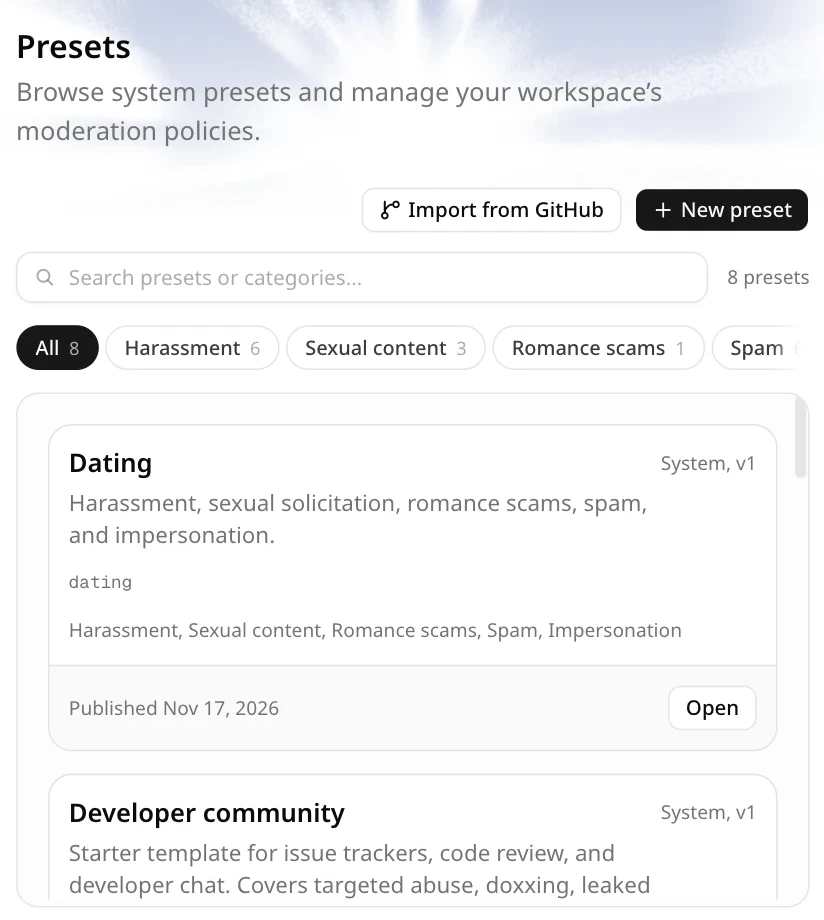
System presets and team presets
- System preset. A read-only starter template seeded into the deployment. Open it to review its rules, then Fork it to make an editable team preset. System presets are never edited in place.
- Team preset. A preset owned by the active workspace. Owners and admins can edit, test, publish, fork, and roll back.
A system preset with no published version means the deployment has not run the system preset seed. It cannot be used or forked until the operator seeds it.
Categories and thresholds
Scores run from 0 to 1. For each category:
- Allow when the score is below the flag threshold.
- Flag when the score reaches the flag threshold but stays below the block threshold.
- Block when the score reaches the block threshold.
The final verdict is conservative: any blocked category makes the decision block; otherwise any flagged category makes it flag; otherwise the decision is allow.
Severity does not change those bands. It contributes to escalation and tie-breaking. Severity 8 and above is high severity.
Versions and publishing
A published version is immutable. Your edits stay in the browser tab until you publish. Publishing creates the next version and points the preset at it.
- The editor never saves an unpublished draft on the server.
- Creating a preset, forking a preset, and publishing a new version each need a completed test of the exact policy at its default level. The test must run a real decision, not a degraded fallback.
- History shows published versions. Opening a version loads it into the draft; it does not change the active version. Rollback moves the active pointer to an existing version.
- New requests that reference the preset by
preset_iduse the active version.
Next
- Import from GitHub for loading one policy file pinned to a commit.
- Preset editor covers editing, testing, and publishing in detail.
- Playground runs one message against a published preset.